Seqera AWS workspaces with Terraform
v 1.0
Andrew Patterson
Document History
Section titled “Document History”| Version | Date | Who | Change Summary |
|---|---|---|---|
| initial | Jun 2026 | AP | Write-up of existing technique |
Overview
Section titled “Overview”One of the researcher environments that we want to enable for researchers is Seqera Enterprise.
We have been assigned a Seqera organisation within the Australian BioCommons instance, and want to reliably setup workspaces and AWS accounts to enable reserachers to do their work. The researchers span different projects and research groups - so we need to be flexible in the number of workspaces and AWS accounts we create (i.e. we do not just have one).
As Terraform is our main infrastructure tool for base AWS configuration, we decided to approach the problem of setting up these environments using Terraform.
The main purpose of this Terraform guide is to show how we unify the construction of an AWS environment with a corresponding Seqera workspace.
We will step through each of the terraform scripts in our example project with some explanatory text. The complete project is available here.
Base Terraform
Section titled “Base Terraform”The basic configuration of Terraform for our setup will require three providers. One is used for some time operations (e.g. “wait 5 seconds”), and the other two allow us to control resources from AWS and Seqera respectively.
terraform {  required_providers {    time = {      source  = "hashicorp/time"      version = "~>0"    }    aws = {      source = "hashicorp/aws"      version = "~>6"    }    seqera = {      source  = "seqeralabs/seqera"      version = "0.40.0-rc8"    }  }}
provider "aws" {  region = "ap-southeast-2"}
# we create AWS resources in the context of the current AWS caller# so sometimes we need this valuedata "aws_caller_identity" "current" { }
# equally the current region is usefuldata "aws_region" "current" { }
data "aws_availability_zones" "available" {  state = "available"}
provider "seqera" {  server_url  = var.seqera_server_url  bearer_auth = var.seqera_bearer_auth}
We have not configured any particular backends here - so Terraform state will be written into the same folder as the Terraform files. For an example project, this is adequate, but for production use cases other state backends should be introduced.
Our first problem is that we need to safely give Terraform permissions in our Seqera environment to use the API - through the use of a bearer token. There are many approaches to secret management in Terraform - in our case here we will use a Terraform variable and pass the values in via environment variables. This should all be done out-of-band (so no checking this into GitHub!)
export TF_VAR_seqera_server_url="https://seqera.services.my.org/api"export TF_VAR_seqera_bearer_auth="eyJ0aWQ...="export TF_VAR_seqera_org_id="123456789"The variables that we can use to configure all the settings in our examples can also be introduced by environment variables - or left at a default (where present).
variable "seqera_bearer_auth" { type = string sensitive = true}variable "seqera_server_url" { type = string}variable "seqera_org_id" { type = number}variable "seqera_short_name" { type = string default = "analysis"}variable "seqera_maintainers" { type = list(string) default = [ // insert a list of email address (as registered in your seqera instance) // for users that will be made maintainers in the workspace ]}At this point we would be able to use Terraform to deploy a workspace. To see
what would happen now (this will not actually produce resources so
feel free to execute this!) - we can init and plan. We imagine
that dev is the AWS profile for the account we want to operate in (adjust to your
AWS configuration).
export AWS_PROFILE="dev"terraform initterraform planWe will now talk through various aspects of the Terraform for both AWS and Seqera.
Base AWS Setup
Section titled “Base AWS Setup”Our first task in AWS is to set up the network in which AWS activity will take place.
This could obviously be as complex as one might want but for our example we create a simple VPC with two public subnets.
We also add in gateways that will mean that access to S3 and Dynamo will go direct to AWS rather than via the Internet (this is optional but costs nothing and is generally considered best practice).
locals {  vpc_cidr             = "10.0.0.0/16"  vpc_public_subnet_count = 2}
resource "aws_vpc" "main" {  cidr_block           = local.vpc_cidr  enable_dns_support   = true  enable_dns_hostnames = true}
resource "aws_internet_gateway" "main" {  vpc_id = aws_vpc.main.id}
resource "aws_subnet" "public" {  count = local.vpc_public_subnet_count
  vpc_id                  = aws_vpc.main.id  cidr_block              = cidrsubnet(local.vpc_cidr, 4, count.index)  availability_zone       = data.aws_availability_zones.available.names[count.index]  map_public_ip_on_launch = true}
resource "aws_route_table" "public" {  vpc_id = aws_vpc.main.id
  route {    cidr_block = "0.0.0.0/0"    gateway_id = aws_internet_gateway.main.id  }}
resource "aws_route_table_association" "public" {  count = local.vpc_public_subnet_count
  subnet_id      = aws_subnet.public[count.index].id  route_table_id = aws_route_table.public.id}
resource "aws_vpc_endpoint" "s3" {  vpc_id            = aws_vpc.main.id  service_name      = "com.amazonaws.${data.aws_region.current.region}.s3"  vpc_endpoint_type = "Gateway"  route_table_ids   = [aws_route_table.public.id]}
resource "aws_vpc_endpoint" "dynamodb" {  vpc_id            = aws_vpc.main.id  service_name      = "com.amazonaws.${data.aws_region.current.region}.dynamodb"  vpc_endpoint_type = "Gateway"  route_table_ids   = [aws_route_table.public.id]}
We then need to define the security groups that will wrap all our compute. In our case we have no need to connect into the workflow compute nodes - so we will set it up to allow egress only. We have chosen public subnets - this avoids the need for a standing cost of a NAT gateway - and with the security group settings below is no less secure for the types of jobs that are run by Seqera.
# NOTE that we choose to put the instances in a public subnet so we should# be relatively careful of the ingress rules on this security group# here we have a default of no access from external IPsresource "aws_security_group" "security_group" {  name_prefix = "seqera-${var.seqera_short_name}-security-group"  description = "Allow suitable traffic for Seqera batch instances"  vpc_id      = aws_vpc.main.id
  # see terraform docs for security groups - this may help with deleting resources  lifecycle {    create_before_destroy = true  }}
resource "aws_vpc_security_group_egress_rule" "allow_all_traffic_ipv4" {  # allow all traffic out  security_group_id = aws_security_group.security_group.id  cidr_ipv4         = "0.0.0.0/0"  ip_protocol       = "-1"}
The Seqera control plane (and web user interface) is given access to an AWS user that helps it perform operations in the target account. This user is responsible for creating the actual compute environments (“forging the Batch environments”, hence the name Batch forge).
This user also performs operations that show the content of buckets in the user interface, so we give it specialised permissions to allow it to see only designated buckets in the AWS account.
The policy here feels quite complex and verbose - but is documented directly in the Seqera documentation. Representing it here in Terraform means that for more complex scenarios it could be tightened as a policy. For instance, we could introduce variables at a stack level like “wantsToUseEfs”, and if the researcher is not going to use EFS we could remove all AWS permissions for EFS from the policy.
# an IAM user which will be used by Seqera to then create Batch environmentsresource "aws_iam_user" "batch_forge_user" {  name = "seqera-${var.seqera_short_name}-batch-forge-user"}
# an IAM group we will put the user in - this is recommended AWS technique (see IAM.2 security control)resource "aws_iam_group" "batch_forge_group" {  name = "seqera-${var.seqera_short_name}-batch-forge-group"}
resource "aws_iam_user_group_membership" "batch_forge_user_in_group" {  user = aws_iam_user.batch_forge_user.name
  groups = [    aws_iam_group.batch_forge_group.name  ]}
# standard policies as recommended by Seqera documentation# https://github.com/seqeralabs/nf-tower-aws/tree/master/forge
resource "aws_iam_policy" "batch_forge_policy" {  # NOTE: these can't be inline policies as they are > 2048 characters  # therefore we need to make a uniquely named policy for each user  name_prefix = "seqera-${var.seqera_short_name}-forge-policy"  description = "Policy giving permissions to Forge to create Seqera compute environments"
  policy = jsonencode({    Version = "2012-10-17"    Statement = [      {        Effect   = "Allow"        Resource = "*",        Action = [          "ssm:GetParameters",          "iam:CreateInstanceProfile",          "iam:DeleteInstanceProfile",          "iam:GetRole",          "iam:RemoveRoleFromInstanceProfile",          "iam:CreateRole",          "iam:CreateServiceLinkedRole",          "iam:DeleteRole",          "iam:AttachRolePolicy",          "iam:PutRolePolicy",          "iam:AddRoleToInstanceProfile",          "iam:PassRole",          "iam:DetachRolePolicy",          "iam:ListAttachedRolePolicies",          "iam:DeleteRolePolicy",          "iam:ListRolePolicies",          "iam:TagRole",          "iam:TagInstanceProfile",          "batch:CreateComputeEnvironment",          "batch:DescribeComputeEnvironments",          "batch:CreateJobQueue",          "batch:DescribeJobQueues",          "batch:UpdateComputeEnvironment",          "batch:DeleteComputeEnvironment",          "batch:UpdateJobQueue",          "batch:DeleteJobQueue",          "fsx:DeleteFileSystem",          "fsx:DescribeFileSystems",          "fsx:CreateFileSystem",          "fsx:TagResource",          "ec2:DescribeSecurityGroups",          "ec2:DescribeAccountAttributes",          "ec2:DescribeSubnets",          "ec2:DescribeLaunchTemplates",          "ec2:DescribeLaunchTemplateVersions",          "ec2:CreateLaunchTemplate",          "ec2:DeleteLaunchTemplate",          "ec2:DescribeKeyPairs",          "ec2:DescribeVpcs",          "ec2:DescribeInstanceTypeOfferings",          "ec2:GetEbsEncryptionByDefault",          "elasticfilesystem:DescribeMountTargets",          "elasticfilesystem:CreateMountTarget",          "elasticfilesystem:CreateFileSystem",          "elasticfilesystem:DescribeFileSystems",          "elasticfilesystem:DeleteMountTarget",          "elasticfilesystem:DeleteFileSystem",          "elasticfilesystem:UpdateFileSystem",          "elasticfilesystem:PutLifecycleConfiguration",          "elasticfilesystem:TagResource"        ]      }    ]  })}
resource "aws_iam_policy" "launch_policy_base" {  name_prefix = "seqera-${var.seqera_short_name}-launch-policy"  description = "Policy giving base permissions for both Seqera Launch and Batch Forge"
  policy = jsonencode({    Version = "2012-10-17"    Statement = [      # we do not mind allowing all the buckets to be listed by the UI      {        Effect   = "Allow"        Resource = "*",        Action = [          "s3:ListAllMyBuckets",          "s3:GetBucketLocation",          "s3:GetBucketAcl"        ]      },      # we are happy to give broad read-only S3 access to the UI and forge - but only for      # buckets *outside* our own account      # access to *inside* our account we want to give explicitly      {        Effect   = "Allow"        Resource = "*",        Action = [          "s3:Get*",          "s3:List*"        ]        Condition = {          "StringNotEquals" : {            "s3:ResourceAccount" : [              data.aws_caller_identity.current.account_id            ]          }        }      },      {        Effect   = "Allow"        Resource = "*",        Action = [          "batch:DescribeJobQueues",          "batch:CancelJob",          "batch:SubmitJob",          "batch:ListJobs",          "batch:TagResource",          "batch:DescribeComputeEnvironments",          "batch:TerminateJob",          "batch:DescribeJobs",          "batch:RegisterJobDefinition",          "batch:DescribeJobDefinitions",          "ecs:DescribeTasks",          "ec2:DescribeInstances",          "ec2:DescribeInstanceTypes",          "ec2:DescribeInstanceAttribute",          "ecs:DescribeContainerInstances",          "ec2:DescribeInstanceStatus",          "ec2:DescribeImages",          "logs:Describe*",          "logs:Get*",          "logs:List*",          "logs:StartQuery",          "logs:StopQuery",          "logs:TestMetricFilter",          "logs:FilterLogEvents",          "ses:SendRawEmail"        ]      }    ]  })}
resource "aws_iam_policy" "launch_data_policy" {  name_prefix = "seqera-${var.seqera_short_name}-launch-data-policy"  description = "Policy giving working bucket data access for Seqera Launch"
  policy = jsonencode({    Version = "2012-10-17"    Statement = [      {        Effect   = "Allow"        Resource = aws_s3_bucket.working_bucket.arn,        Action = [          "s3:ListBucket",          "s3:GetBucketLocation"        ]      },      {        Effect   = "Allow"        Resource = "${aws_s3_bucket.working_bucket.arn}/*",        Action = [          "s3:GetObject",          "s3:GetObjectTagging",          "s3:PutObject",          "s3:PutObjectTagging",          "s3:DeleteObject"        ]      }
    ]  })}
resource "aws_iam_policy" "launch_secret_policy" {  name_prefix = "seqera-${var.seqera_short_name}-launch-secret-policy"  description = "Policy giving secrets access for Seqera Launch"
  policy = jsonencode({    Version = "2012-10-17"    Statement = [      {        Effect   = "Allow"        Resource = "*",        Action = [          "secretsmanager:DescribeSecret",          "secretsmanager:DeleteSecret",          "secretsmanager:ListSecrets",          "secretsmanager:CreateSecret"        ]      }    ]  })}

resource "aws_iam_group_policy_attachment" "attach_policies_to_group_1" {  group      = aws_iam_group.batch_forge_group.name  policy_arn = aws_iam_policy.batch_forge_policy.arn}
resource "aws_iam_group_policy_attachment" "attach_policies_to_group_2" {  group      = aws_iam_group.batch_forge_group.name  policy_arn = aws_iam_policy.launch_policy_base.arn}
resource "aws_iam_group_policy_attachment" "attach_policies_to_group_3" {  group      = aws_iam_group.batch_forge_group.name  policy_arn = aws_iam_policy.launch_data_policy.arn}
resource "aws_iam_group_policy_attachment" "attach_policies_to_group_4" {  group      = aws_iam_group.batch_forge_group.name  policy_arn = aws_iam_policy.launch_secret_policy.arn}
Seqera will require a working bucket in order to maintain state between stages of running pipelines. Here we show an example of how we can set up a bucket that is restricted to only the specific user we created above, meaning the workspaces in the same AWS account cannot see each others work.
This may of course may be overkill for many research groups - in which case just a plain S3 bucket with no policy statement would work fine.
resource "aws_s3_bucket" "working_bucket" {  bucket           = format("seqera-%s-work-%s-%s-an", var.seqera_short_name, data.aws_caller_identity.current.account_id, data.aws_region.current.region)  bucket_namespace = "account-regional"
  # working artifacts should not need to be retained  force_destroy = true}
resource "aws_s3_bucket_policy" "working_bucket_policy" {  bucket = aws_s3_bucket.working_bucket.id
  policy = jsonencode({    Version = "2012-10-17"    Statement = [      {        Effect    = "Deny",        // by default - we do not want other Seqera users in the same account to be able to operate on the        // content of the working bucket        // this lets us create multiple workspaces in the same account but have the        // working buckets separated *inside the seqera UI*. Outside the Seqera UI - AWS users will        // be able to alter bucket policies and all sorts of things so it is not a comprehensive        // security policy in that regard. It mainly denies casual browsing.        Principal = "*",        Action    =  ["s3:GetObject*", "s3:PutObject*", "s3:List*", "s3:DeleteObject*", "s3:RestoreObject"],        Resource = [          aws_s3_bucket.working_bucket.arn,          "${aws_s3_bucket.working_bucket.arn}/*"        ],        Condition = {          ArnLike = {            "aws:PrincipalArn" = "arn:aws:iam::${data.aws_caller_identity.current.account_id}:user/seqera-*-batch-forge-user"          }          StringNotEquals = {            "aws:userid" = aws_iam_user.batch_forge_user.unique_id          }        }      }    ]  })}
Finally, we need to create an access key - as this is the mechanism that Seqera uses to authenticate with AWS. We will use these credentials later to bind the Seqera workspace into our AWS permissions.
# generate an access key for the IAM user - which will be available to create Seqera# credentials# NOTE: whilst the secret in this is marked "secure" - care still needs to be# taken because this value will go into the Terraform state in plain text. So make sure# terraform state is not trivially readable by end usersresource "aws_iam_access_key" "batch_forge_access_key" { user = aws_iam_user.batch_forge_user.name}A little snippet helps delay the creation of any Seqera resources until after all the AWS constructs have settled.
# the AWS permissions associated with our users will immediately be used by Seqera for# creating compute environments - which means that unless all the policy attachments etc# have propagated through AWS "eventual consistency" - you can get a race condition of# the compute env creation failing in various way# we add in this deliberate delay to allow the AWS network and AWS IAM system to settle# 30 seconds is arbitrary but seems perfectly adequate so farresource "time_sleep" "wait_for_user_complete" { create_duration = "30s" depends_on = [ aws_iam_group_policy_attachment.attach_policies_to_group_1, aws_iam_group_policy_attachment.attach_policies_to_group_2, aws_iam_group_policy_attachment.attach_policies_to_group_3, aws_iam_group_policy_attachment.attach_policies_to_group_4, aws_iam_access_key.batch_forge_access_key, // the VPC endpoint will only be created after the vpc and subnets so it is a good // one to wait for aws_vpc_endpoint.s3 ]}Seqera Itself
Section titled “Seqera Itself”We start our configuration of Seqera by creating a workspace. The workspace is an area that the user selects from the Seqera user interface - and represents a collection of pipelines and results.
resource "seqera_workspace" "workspace" { org_id = var.seqera_org_id name = var.seqera_short_name full_name = var.seqera_short_name visibility = "PRIVATE"}In order to provide the workspace with access to compute and storage - we need to give Seqera a mechanism to access AWS. To achieve this, we add a set of Seqera credentials - taking their key/secret from the IAM user we made in AWS portion of the setup.
resource "seqera_aws_credential" "credential" {  depends_on = [    time_sleep.wait_for_user_complete  ]
  name         = "${var.seqera_short_name}-credentials"  workspace_id = seqera_workspace.workspace.id
  access_key = aws_iam_access_key.batch_forge_access_key.id  secret_key = aws_iam_access_key.batch_forge_access_key.secret}
The main Seqera resource that we now create is the compute environment - and this is where our combination of AWS and Seqera in a single Terraform comes to the fore.
Rather than manually creating compute environments by copy/pasting values from the AWS console - we can directly share the values from the VPC and security group into this compute environment resource.
Note that another advantage of representing this setup in Terraform is that decisions
like max_cpus (which is a big factor in potential cost to researchers) can
be documented as part of creating the Terraform. Furthermore,
researchers can ask for increases to this value by raising a change request
on this Terraform source - all of which is activity that is auditable
and retains a history of reasons/discussions.
resource "seqera_aws_batch_ce" "compute" {  workspace_id = seqera_workspace.workspace.id
  name           = "${var.seqera_short_name}-compute-env"  description    = "AWS Batch compute environment for workspace ${var.seqera_short_name}"  credentials_id = seqera_aws_credential.credential.credentials_id
  config = {    forge = {      // alloc_strategy      allow_buckets = [        // this needs to be the last entry and must match the work_dir        // (otherwise seqera and the terraform will drift)        "s3://${aws_s3_bucket.working_bucket.id}"      ]      // arm64_enabled      dispose_on_deletion = true      // ebs_boot_size      max_cpus        = 64      min_cpus        = 0      security_groups = [aws_security_group.security_group.id]      subnets         = [for s in aws_subnet.public : s.id]      type   = "SPOT"      vpc_id = aws_vpc.main.id    }    region   = aws_s3_bucket.working_bucket.region    work_dir = "s3://${aws_s3_bucket.working_bucket.id}"  }}
Finally, we need to declare which users can access the workspace. Users will need to have already logged in to Seqera so that their email address is associated with an account.
resource "seqera_workspace_participant" "maintainers" {  for_each = toset(sort(var.seqera_maintainers))
  org_id       = var.seqera_org_id  workspace_id = seqera_workspace.workspace.id  email        = each.key  role         = "maintain"}
Result
Section titled “Result”terraform apply will then take these Terraform files and instantiate all
the resources. For reference, we have attached an example of the output below
(though cut down for brevity).
➜ terraform applydata.aws_region.current: Reading...data.aws_availability_zones.available: Reading...data.aws_caller_identity.current: Reading...data.aws_region.current: Read complete after 0s [id=ap-southeast-2]data.aws_caller_identity.current: Read complete after 0s [id=987654321012]data.aws_availability_zones.available: Read complete after 1s [id=ap-southeast-2]
Terraform used the selected providers to generate the following execution plan. Resource actions are indicated with the following symbols:  + create
Terraform will perform the following actions:
  # aws_iam_access_key.batch_forge_access_key will be created  + resource "aws_iam_access_key" "batch_forge_access_key" {      + create_date                    = (known after apply)      + encrypted_secret               = (known after apply)      + encrypted_ses_smtp_password_v4 = (known after apply)      + id                             = (known after apply)      + key_fingerprint                = (known after apply)      + secret                         = (sensitive value)      + ses_smtp_password_v4           = (sensitive value)      + status                         = "Active"      + user                           = "seqera-analysis-batch-forge-user"    }
    ... REDACTED ...
  # seqera_workspace.workspace will be created  + resource "seqera_workspace" "workspace" {      + date_created = (known after apply)      + description  = (known after apply)      + full_name    = "analysis"      + id           = (known after apply)      + last_updated = (known after apply)      + name         = "analysis"      + visibility   = "PRIVATE"    }
  # time_sleep.wait_for_user_complete will be created  + resource "time_sleep" "wait_for_user_complete" {      + create_duration = "30s"      + id              = (known after apply)    }
Plan: 29 to add, 0 to change, 0 to destroy.
Do you want to perform these actions?  Terraform will perform the actions described above.  Only 'yes' will be accepted to approve.
  Enter a value: yes
seqera_workspace.workspace: Creating...aws_iam_group.batch_forge_group: Creating...aws_iam_user.batch_forge_user: Creating...aws_iam_policy.launch_secret_policy: Creating...aws_iam_policy.batch_forge_policy: Creating...aws_iam_policy.launch_policy_base: Creating...aws_vpc.main: Creating...aws_s3_bucket.working_bucket: Creating...seqera_workspace.workspace: Creation complete after 1s [name=analysis]aws_iam_user.batch_forge_user: Creation complete after 1s [id=seqera-analysis-batch-forge-user]aws_iam_access_key.batch_forge_access_key: Creating...aws_vpc.main: Creation complete after 1s [id=vpc-0acecd722c40cac40]aws_internet_gateway.main: Creating...aws_subnet.public[1]: Creating...aws_subnet.public[0]: Creating...aws_security_group.security_group: Creating...aws_iam_group.batch_forge_group: Creation complete after 1s [id=seqera-analysis-batch-forge-group]aws_iam_user_group_membership.batch_forge_user_in_group: Creating...aws_iam_access_key.batch_forge_access_key: Creation complete after 0s [id=AKIA4IIQPSICERF3QF4W]aws_iam_policy.launch_policy_base: Creation complete after 1s [id=arn:aws:iam::987654321012:policy/seqera-analysis-launch-policy20260609055322688300000003]aws_iam_group_policy_attachment.attach_policies_to_group_2: Creating...aws_iam_policy.launch_secret_policy: Creation complete after 1s [id=arn:aws:iam::987654321012:policy/seqera-analysis-launch-secret-policy20260609055322687800000001]aws_iam_group_policy_attachment.attach_policies_to_group_4: Creating...aws_iam_policy.batch_forge_policy: Creation complete after 1s [id=arn:aws:iam::987654321012:policy/seqera-analysis-forge-policy20260609055322688000000002]aws_iam_group_policy_attachment.attach_policies_to_group_1: Creating...aws_internet_gateway.main: Creation complete after 0s [id=igw-09a34ed216245e7fc]aws_route_table.public: Creating...aws_s3_bucket.working_bucket: Creation complete after 2s [id=seqera-analysis-work-987654321012-ap-southeast-2-an]aws_s3_bucket_policy.working_bucket_policy: Creating...aws_iam_policy.launch_data_policy: Creating...aws_iam_user_group_membership.batch_forge_user_in_group: Creation complete after 1s [id=terraform-20260609055324589700000007]aws_iam_group_policy_attachment.attach_policies_to_group_2: Creation complete after 1s [id=seqera-analysis-batch-forge-group-20260609055324641100000001]aws_iam_group_policy_attachment.attach_policies_to_group_4: Creation complete after 1s [id=seqera-analysis-batch-forge-group-20260609055324654200000002]aws_iam_group_policy_attachment.attach_policies_to_group_1: Creation complete after 1s [id=seqera-analysis-batch-forge-group-20260609055324680300000003]aws_s3_bucket_policy.working_bucket_policy: Creation complete after 0s [id=seqera-analysis-work-987654321012-ap-southeast-2-an]aws_route_table.public: Creation complete after 1s [id=rtb-078136f0bdd6aed3d]aws_vpc_endpoint.dynamodb: Creating...aws_vpc_endpoint.s3: Creating...aws_iam_policy.launch_data_policy: Creation complete after 0s [id=arn:aws:iam::987654321012:policy/seqera-analysis-launch-data-policy20260609055324553900000006]aws_security_group.security_group: Creation complete after 1s [id=sg-0cc8154fdf4f3f577]aws_iam_group_policy_attachment.attach_policies_to_group_3: Creating...aws_vpc_security_group_egress_rule.allow_all_traffic_ipv4: Creating...aws_vpc_security_group_egress_rule.allow_all_traffic_ipv4: Creation complete after 1s [id=sgr-0b1d56e3f8c908df4]aws_iam_group_policy_attachment.attach_policies_to_group_3: Creation complete after 1s [id=seqera-analysis-batch-forge-group-20260609055325728900000004]aws_vpc_endpoint.s3: Creation complete after 7s [id=vpce-0e17b0af45fa88d0f]time_sleep.wait_for_user_complete: Creating...aws_vpc_endpoint.dynamodb: Creation complete after 8s [id=vpce-08e5a90467c733ffb]aws_subnet.public[0]: Still creating... [00m10s elapsed]aws_subnet.public[1]: Still creating... [00m10s elapsed]aws_subnet.public[1]: Creation complete after 11s [id=subnet-04084486dbb6e9305]aws_subnet.public[0]: Creation complete after 13s [id=subnet-03071d4903481636e]aws_route_table_association.public[1]: Creating...aws_route_table_association.public[0]: Creating...aws_route_table_association.public[0]: Creation complete after 1s [id=rtbassoc-065920ff5f5852c91]aws_route_table_association.public[1]: Creation complete after 1s [id=rtbassoc-049b88f84d0fa9878]time_sleep.wait_for_user_complete: Still creating... [00m10s elapsed]time_sleep.wait_for_user_complete: Still creating... [00m20s elapsed]time_sleep.wait_for_user_complete: Still creating... [00m30s elapsed]time_sleep.wait_for_user_complete: Creation complete after 30s [id=2026-06-09T05:54:01Z]seqera_aws_credential.credential: Creating...seqera_aws_credential.credential: Creation complete after 0s [id=1qWP0az58yD2dW0uyjvbRk]seqera_aws_batch_ce.compute: Creating...seqera_aws_batch_ce.compute: Still creating... [00m10s elapsed]seqera_aws_batch_ce.compute: Still creating... [00m20s elapsed]seqera_aws_batch_ce.compute: Still creating... [00m30s elapsed]seqera_aws_batch_ce.compute: Still creating... [00m40s elapsed]seqera_aws_batch_ce.compute: Still creating... [00m50s elapsed]seqera_aws_batch_ce.compute: Creation complete after 53s [id=1H49a4eEGDduozWsi1uhUi]
Apply complete! Resources: 29 added, 0 changed, 0 destroyed.
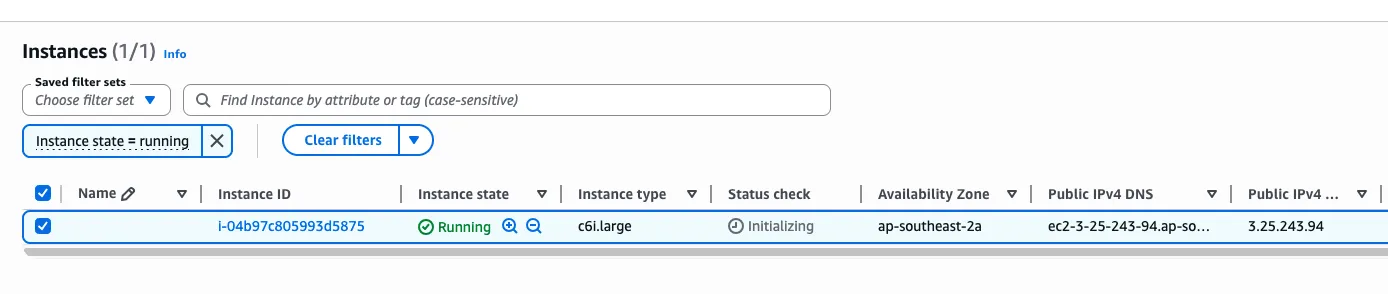
To show that this new workspace is functional - we run a Hello World pipeline.
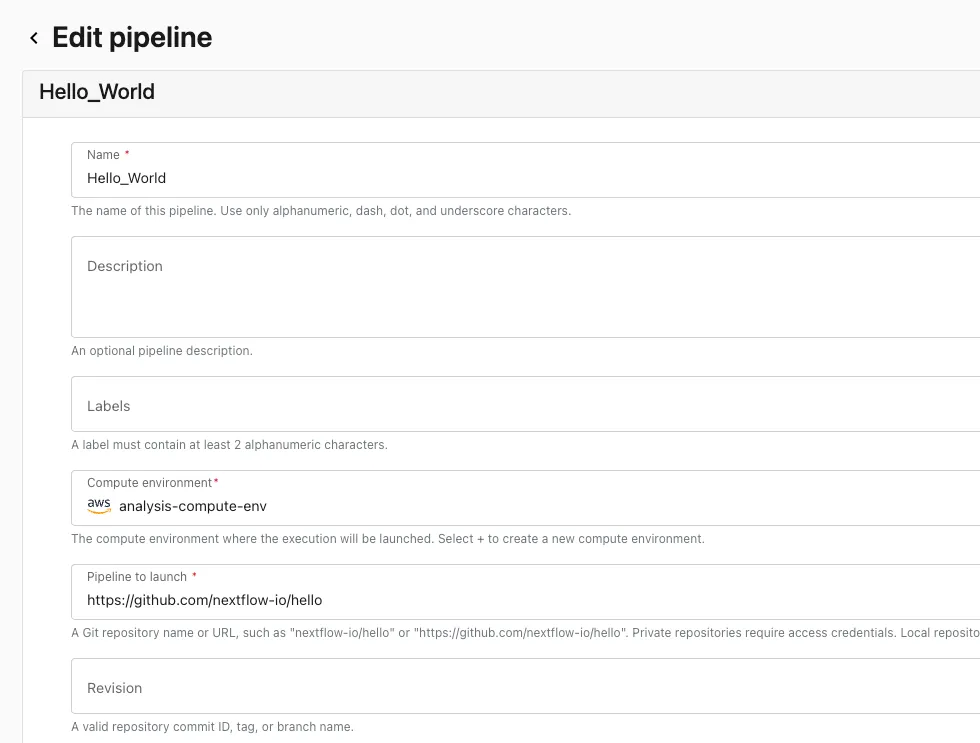
The workflow once started.
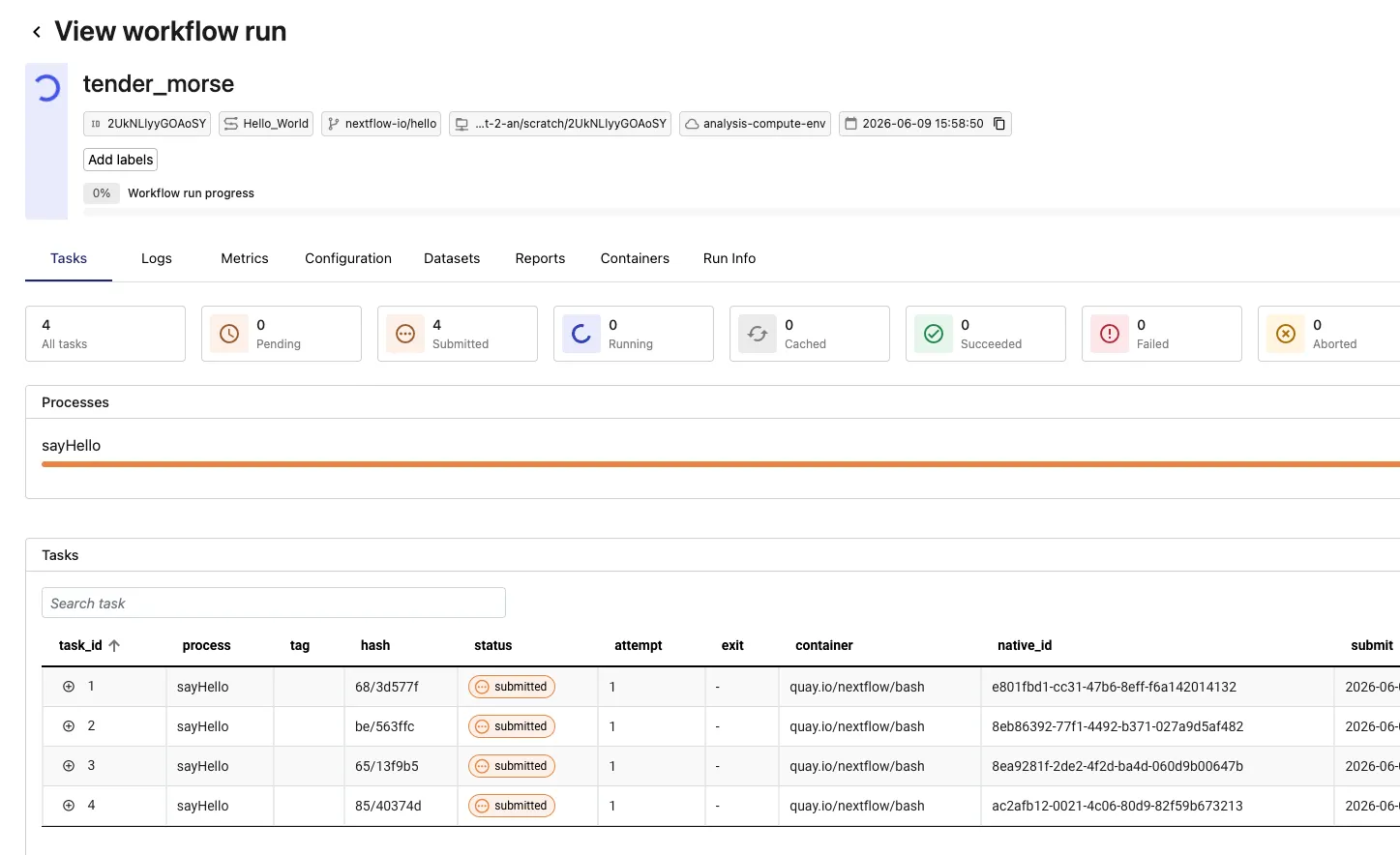
The accompanying machines in AWS running the workflow - proof that we have successfully connected Seqera to AWS.
Conclusion
Section titled “Conclusion”Terraform providers for Seqera and AWS allow us to easily and repeatably deploy Seqera workspaces. By combining the definition of the AWS networking with the Seqera definitions - we create workspaces that require no clicking or copy-pasting in the Seqera user interface. Administrators can use tools that they are familiar with to create entirely customised Seqera workspaces for researchers.
Future work
Section titled “Future work”This code is just an example - and has been artificially cut down from the full version that is used by CCGCM.
Other useful features that have been implemented but not included in this example:
- Ability to modularise the Terraform so that multiple workspaces can be created - similar, but differing where important
- Ability to create other Seqera resources like Studios